 |
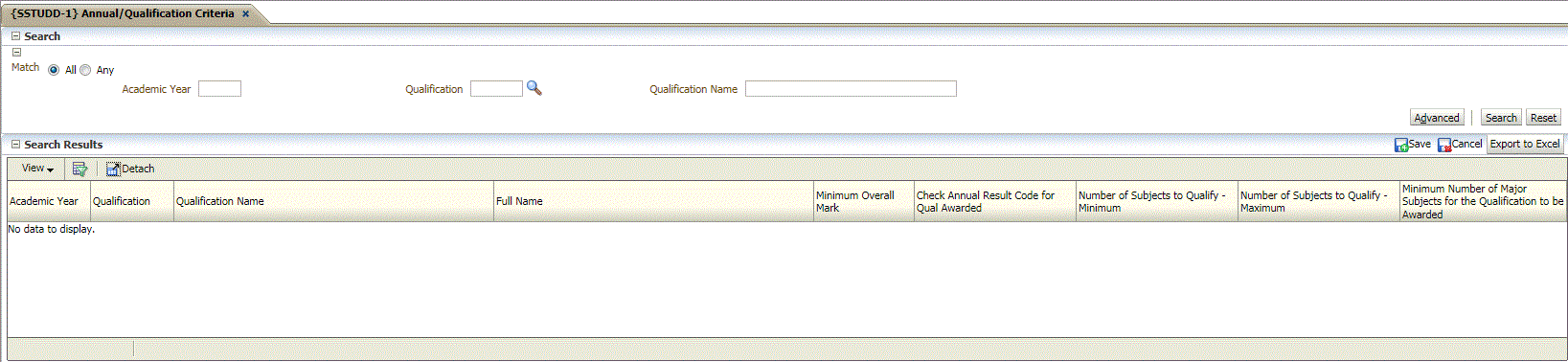
This option allows the user to link criteria to existing qualifications in order to:
| Field | Type & Length |
Description |
|---|---|---|
| Academic Year | N4 | Enter the calendar year for this record. |
| Qualification Code | A6 | The qualification code as it exists on the academic structure. {SACADO-1}. |
| Minimum Overall Mark | N6 | Enter the minimum overall mark for graduation purposes. |
| Check Annual Result for Qualification Award | A1 | Should only specific annual results be used for awarded Qualifications (Y)es / (N)o? |
| Number of Subjects to Qualify - Minimum | N2 | If the rules for obtaining a qualification specify a minimum number of subjects that must be passed, this number can be entered here. |
| Number of Subjects to Qualify - Maximum | N2 | If there are a maximum number of subjects that can be credited towards obtaining a qualification, this number can be entered here. |
| Minimum Number of Major Subjects For Qualification To be Awarded | N2 | This is minimum number of major subjects for a qualification to be awarded. |
|
| Processing Rules |
|
|---|---|
| |
| Date | System Version | By Whom | Job | Description |
|---|---|---|---|---|
| 19-Mar-2016 | v04.0.0.0 | Magda van der Westhuizen | t205922 | Change SACAD menu's and links to SACADO. |
| 18-Feb-2016 | v04.0.0.0 | Magda van der Westhuizen | t208942 | Create INT4.0 manual for new option. |