 |
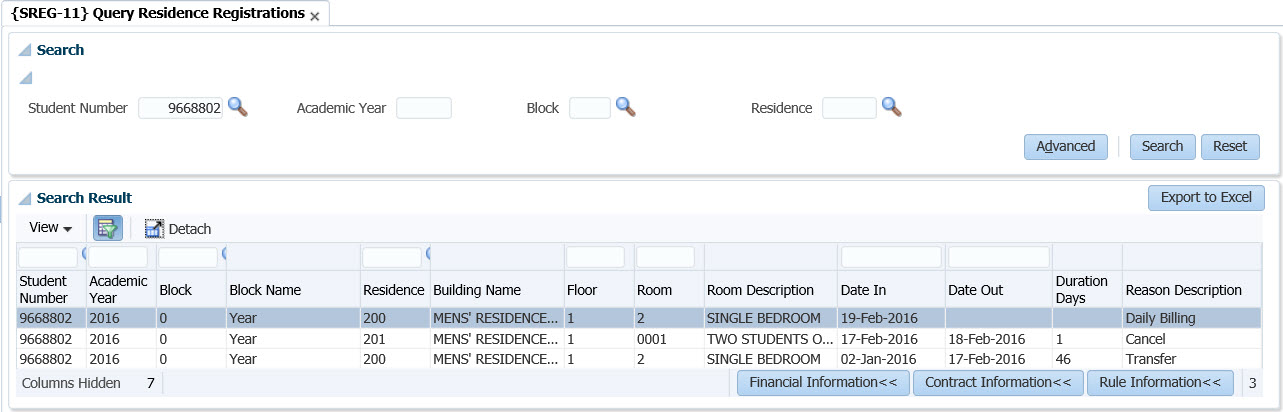
In the 'search ' panel box the user will be able to do a search on either the 'Student Number', 'Academic Year', 'Block Code', and 'Residence Code' or different combinations of all.
| Field | Type & Length |
Description |
|---|---|---|
| Student Number | N9 | The system displays the student number here if the student was queried in the first Block. |
| Academic year |
YYYY |
Specify the 'Academic Year' you want to query the residence registration. |
| Block |
A2 | The academic block during which the student was registered. Blocks are defined under option {SCODE2-1} and are linked to start and end dates under option {GOPS-1} TAB - Residence Periods. |
| Block Name |
A30 | The description of the Block. |
| Residence |
N4 | The Building Code of the Residence in which the student has registered for. |
| Building Name |
A30 | The name of the building as per {SPCS-4}. |
| Floor |
N4 |
The floor number in the default Residence. |
| Room Code |
A7 |
The room number in the default Residence. |
| Room Description |
A30 |
The description of the room. |
| Date In |
DD-MM-YYYY |
The date when the student moved in. |
| Date Out |
DD-MM-YYYY | The date when the student moved out. |
| Duration Days |
N4 |
Number of days the student will / has occupied the residence. |
| Reason Description |
A30 |
Description of the reason for Moving or cancelling residence application. |
|
| Date | System Version | By Whom | Job | Description |
|---|---|---|---|---|
| 20-Feb-2020 | v04.1.0.0 | Hellen Kgosi |
T241962 | New manual. |