 |
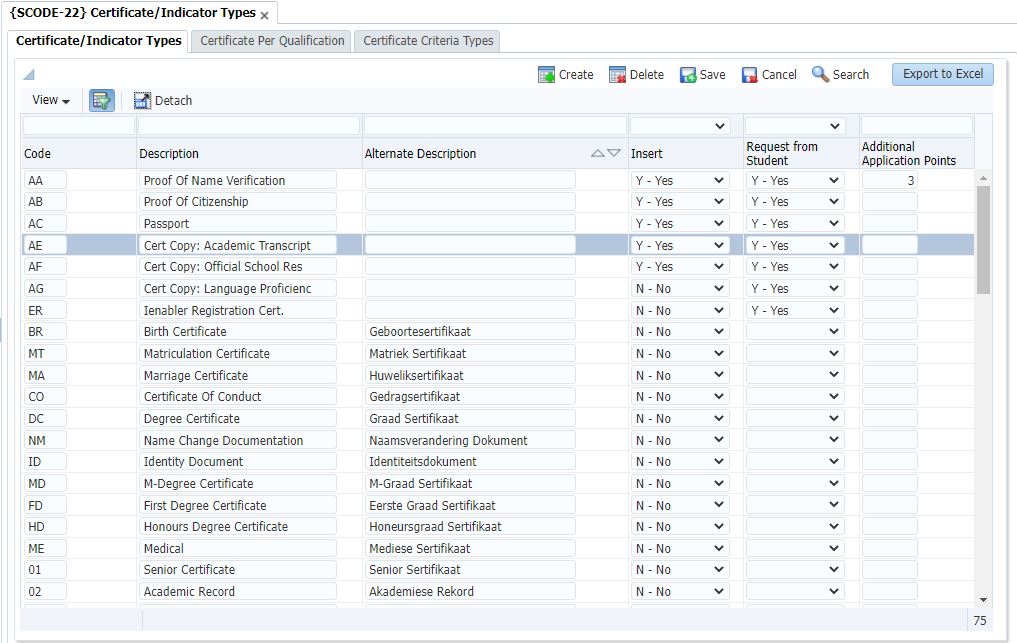
These codes are linked to a student in the Application and Registration Sub-Systems and can be used to identify documentation that a student is required to supply when applying to study, or when registering at the Institution. If the Insert Indicator is set to `Yes' the certificates will automatically be linked to the student on Application and / or Registration. If the Insert Indicator is set to `No' the user will be able to manually link the certificate to a student.
This block is used to capture the codes applicable in the whole student system.
Certificate/Indicator codes can be printed from {SCODER-21}.
| Field | Type & Length |
Description |
|---|---|---|
| Code | A2 | A unique, user-defined Code to identify certificates or indicators that may apply to students. |
| Description | A30 | Certificate / Indicator description e.g. "Matriculation Certificate", "ID Document", "Certificate of Good Conduct", etc. This will be used in correspondence with students who indicated their language of preference as English. |
| Alternative Description | A30 | The Alternate Description of the above. This field is not mandatory but will be used in correspondence with students who indicated their language of preference as alternate. |
| Insert |
A1 |
A value of (Y)es or (N)o must be entered to indicate whether these certificates/indicators must automatically be linked to a student when the following menus are used {SREGB-1 / 4, SNAPPA-3, SDREGA-1 and SREGAR-1}. The default value for this field is (N)o. |
| Request from Student | A1 |
A value of (Y)es or (N)o must be selected if information needs to be communicated to the Student. |
| Additional Application Points | N2 | The Additional Points that must be added to the total score of the applicant. |
|
| Field | Type & Length |
Description |
|---|---|---|
| Qualification | A6 | Select an existing qualification for this field. The <LIST OF VALUES> may be used for the correct code and the description will be displayed. |
| Description | A30 | The qualification description is displayed. |
| Certificate / Indicator Type | A2 | This indicator is selected from the codes defined in Certificate / Indicator types in tab 1. |
| Description | A30 | The description of the Certificate / Indicator type is displayed. |
| Insert | A1 | A value of (Y)es or (N)o must be entered to indicate whether these certificates/indicators must automatically be copied to the "Certificates Seen/Indicators" block for new Applicants and new Biographical Records for this qualification. |
|
| Field | Type & Length |
Description |
|---|---|---|
| Criteria Type | A1 | Select the Criteria Type for which the
Certificate will be Valid:
|
| Criteria Code | A7 | Enter the Criteria Code' according to the criteria type entered in the previous field The program will allow the creation of criteria type 'Q', 'I' and 'T' irrespective if the qualification (Criteria Code) / 'I' - Approved Qualification Id exists on {SACADO-1} / {SACADO-7} for system cycle 'S' on {SMNT-2}. |
| Criteria Description | A40 | The criteria description is displayed. |
| Study Period | A2 |
Enter the Study Period for which the Certificate will be valid. |
| Study Period Description |
A40 | Study Period description is displayed. |
| Certificate Code | A2 | The Certificate Code that will be
linked to the student record. The Certificate Code must exist in tab 1 Certificate / Indicator types. |
| Certificate Code Description | A30 | The certificate description is displayed. |
| Substitute Certificate Code | A2 | Enter the Substitute Certificate Code
for the Main Certificate Code. |
| Substitute Certificate Code Description |
A30 |
The substitute certificate description is displayed. |
| Type of Requirement | A1 | Enter the Type of Requirement |
| Automatic Insert on App/Reg (Y / N) | A1 | Indicate if the certificate must automatically be Inserted on Application or Registration |
| International/ South African or Permanent Resident | A1 | Indicate
if the certificate is required for
|
| Show on Web (Y / N) | A1 | Indicate if the Certificate should be visible/uploaded on the iEnabler/Application Wizard. |
| Mandatory |
A1 |
A value of (Y)es or (N)o must be
entered to indicate which documents will be treated as mandatotry
during online Applications, AOA / Infinity. |
|
| Date | System Version | By Whom | Job | Description |
|---|---|---|---|---|
| 20-Sep-2006 | v01.0.0.0 | Magda van der Westhuizen | t133364 | New manual format. |
| 26-Jul-2007 | v01.0.0.0 | Magda van der Westhuizen | t133364 | Update manual and insert links. |
| 20-Oct-2008 | v01.0.0.0 | Magda van der Westhuizen | t151123 | Update manual: Language Editing: Juliet Gillies. |
| 11-Aug-2016 | v04.0.0.0 | Magda van der Westhuizen | t215650 | Update images to the latest ADF version. |
| 23-Apr-2018 |
v04.1.0.0 |
Frans Pelser |
t222201 |
ATOV 221431, Added Certificate Criteria Types |
| 27-Aug-2018 |
v04.1.0.1 |
Beulah Vries |
t229828 |
Update Manual and insert images for INT4.1 |
| 13-Jan-2021 | v04.1.0.2 | Magda van der Westhuizen | T246391 | Add addition info on tab 3 field 'Criteria Code' regarding system cycle 'S'. |
| 06-Jul-2022 |
v04.1.0.3 |
Elmarie Roos |
T254891 |
Indicate Criteria Types that are institution specific |
| 07-Jul-2025 |
v04.1.0.4 |
Sarah Seeletse |
t272235 |
Add field "Mandatory", in the third tab "Certificate Criteria Type" |

